
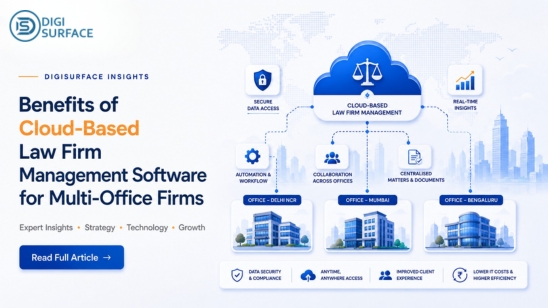
A firm with one office can survive on shared drives, spreadsheets, and a filing cabinet’s worth of institutional memory. A firm with three or four offices can’t. The moment a second location opens, matter data, documents, and billing start quietly drifting out of sync; a client file updated in one office doesn’t reflect in another, the same cost gets logged twice, and by the time anyone notices, reconciling it eats hours nobody billed for. That drift is exactly what cloud-based law firm software is built to solve.
What Is Law Firm Management Software?
Law firm management software is a system that centralizes the core operations of running a legal practice tracking cases and matters, managing documents, and handling billing and finance in one platform instead of scattered tools. It typically spans three overlapping categories: practice or case management (tracking matters, clients, and deadlines), document management (storing and version-controlling files), and legal billing software (tracking billable time, costs, and invoicing). Firms often buy one category assuming it covers the others, then discover gaps which is usually where multi-office confusion starts.
Why Multi-Office Firms Specifically Feel the Pain
Every one of these problems gets worse with a second location, not just bigger:
Duplicate client and matter entries creep in when each office maintains its own records instead of a shared system. Document versions fall out of sync when one office edits a contract locally while another works from an outdated copy. Firm leadership loses a single view of billable hours and matter status because each office’s data lives in its own silo. And finance teams end up manually reconciling costs that were allocated to the wrong matter, the wrong office, or entered twice — the exact “dual entry” problem that eats into billable time without anyone directly causing it, and the same kind of multi-entity reconciliation gap DigiSurface resolves for finance teams through Dynamics 365 Finance & Operations implementations.
Core Capabilities of a Modern Law Practice Management System
A law practice management system built for multi-office firms needs to cover four things well, not just one:
- Legal case and matter management — a single record per matter, visible and consistent whether it’s opened from the head office or a branch
- Legal document management — a centralized, version-controlled repository, so no office is ever working from a stale copy
- Legal billing software — matter-based cost allocation and tax configuration handled systematically, instead of re-entered by hand in each office
- Knowledge management — a shared firm-wide repository for precedents, templates, and internal best practices, so institutional knowledge isn’t trapped in one office
Local Drives vs. Cloud-Based Systems: What Changes for a Multi-Office Firm
Laid out side by side, the operational gap between office-by-office tools and a unified cloud system becomes clear:
| Local drives / siloed tools | Cloud-based law firm software | |
| Document access | Office-specific, prone to version conflicts | One repository, accessible firm-wide |
| Matter visibility | Fragmented across offices | Centralized, real-time |
| Billing accuracy | Manual entry, dual-entry errors | Automated cost allocation per matter |
| Tax handling | Manual, handled office-by-office | Configured and mapped centrally |
| Scaling to a new office | Processes rebuilt from scratch | New office plugs into the existing system |
How DigiSurface’s Law Firm Management Solution Fits
DigiSurface’s Law Firm Management solution is built specifically around these gaps, one integrated platform instead of separate tools stitched together per office. Here’s what that looks like in practice:
- Centralized document access — SharePoint-based repository, one-touch retrieval from any office
- Matter-based cost allocation — Costs tied directly to the matter, not reconciled later
- Multi-tax configuration — Taxes mapped centrally, no office-by-office manual entry
- Structured reimbursement workflows — Consistent payment request process, no dual entry
The result: leadership gets real visibility across every location, and the administrative load that usually falls on individual offices gets automated instead.
Frequently Asked Questions
What is law firm management software?
Law firm management software is a platform that centralizes case and matter tracking, document management, and billing operations for a legal practice, replacing separate spreadsheets, shared drives, and disconnected tools with a single system.
Why do multi-office law firms need cloud-based systems specifically?
Multi-office firms face duplicate data entry, inconsistent document versions, and fragmented matter visibility across locations. Cloud-based systems solve this by centralizing case, document, and billing data so every office works from the same real-time information.
What’s the difference between legal case management and legal matter management?
The terms are often used interchangeably. Legal case management typically refers to tracking the progress and details of individual cases, while legal matter management is the broader umbrella covering everything related to a client engagement, including documents, billing, and case status.
Does law firm software include billing and invoicing?
Yes, most comprehensive law firm management systems include legal billing software functionality, covering time tracking, cost allocation against matters, tax configuration, and invoice generation.
Stop Reconciling What Should Already Match
If matter data, documents, or billing are already drifting out of sync across your offices, that gap only widens as the firm grows. DigiSurface’s Law Firm Management solution brings case tracking, document management, and matter-based billing into one system built for firms operating across multiple locations. Book a consultation to see how it fits your firm’s current setup.