
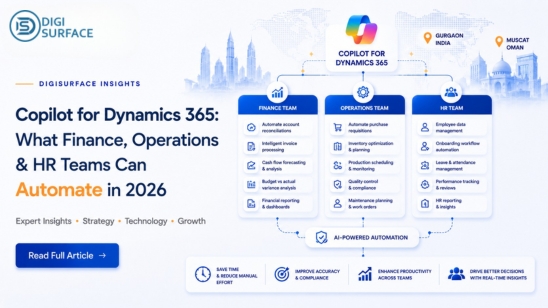
As the digital landscape continues to evolve, businesses need intelligent tools to improve efficiency and stay competitive. In 2026, Microsoft Dynamics 365, powered by AI-driven Copilot, is helping organizations automate critical business processes across Finance, Operations, and HR.
Businesses using Dynamics 365 Finance & Operations can leverage Copilot to automate finance, supply chain, procurement, and operational workflows while improving accuracy, productivity, and decision-making. Working with an experienced Dynamics 365 consulting partner also helps organizations identify the right Copilot use cases and accelerate successful AI adoption.
This guide explores how Copilot transforms business processes by reducing repetitive work, providing actionable insights, and enabling teams to focus on strategic growth.
What Is Copilot for Dynamics 365?
Microsoft Dynamics 365 Copilot is an AI-powered assistant embedded within Dynamics 365 applications that helps businesses automate routine tasks, analyze enterprise data, generate insights, and improve decision-making. It uses natural language capabilities and business data to support finance, operations, sales, and HR teams in completing tasks faster while reducing manual effort.
Unlike traditional automation tools, Copilot works directly within Dynamics 365 workflows to provide contextual recommendations, summarize information, generate content, and assist employees with everyday business activities.
How Does Copilot Work Inside Dynamics 365 Using Microsoft Graph and ERP Data?
Microsoft Dynamics 365 Copilot combines Microsoft Graph with enterprise ERP data to deliver intelligent recommendations, automation, and real-time insights.
By connecting business data across platforms such as Finance, Sales, and Supply Chain, Copilot helps organizations:
- Generate AI-powered insights from existing business data
- Automate repetitive workflows and approval processes
- Improve decision-making with real-time recommendations
- Reduce manual effort across finance and operations processes
- Create a connected and intelligent business environment
Through this integration, users experience enhanced connectivity and workflow automation in Power Platform. Within Dynamics 365 Finance & Operations, these AI-driven capabilities help finance and operations teams streamline processes, improve visibility, and respond faster to changing business needs.
What Copilot for D365 Is NOT
Copilot for Dynamics 365 is designed to enhance existing business processes, not replace core systems or human expertise. It is important to understand what Copilot can and cannot do.
Copilot for Dynamics 365 is not designed to:
- Replace your ERP system
- Operate as a standalone AI chatbot
- Make business decisions without human oversight
- Eliminate the need for finance, HR, or operations teams
- Replace existing approval workflows or governance processes
Instead, Copilot acts as an intelligent assistant that helps employees work more efficiently by automating repetitive tasks and providing relevant insights.
Dynamics 365 Finance Copilot: Automation Use Cases for CFOs
| Finance Process | What Copilot Automates | Business Benefit |
| Accounts Payable | Invoice summarization and anomaly detection | Faster invoice processing with fewer errors |
| Budget Management | Variance analysis | Quick identification of budget deviations |
| Financial Reporting | Financial statement drafting from GL data | Reduced manual reporting effort |
| Collections | Collection letter generation from AR aging reports | Improved cash flow and faster collections |
Invoice Summarization and Anomaly Detection in AP
In finance, time equates to value. Copilot’s capabilities significantly streamline invoice processing by summarizing data and alerting teams to anomalies, such as potential fraud or errors. This efficiency in handling accounts payable (AP) translates to faster, more accurate financial operations and mitigates risks associated with manual processing errors. Users can receive an AI-generated summary of their workflow history.
Variance Analysis — “Why Is This Account Over Budget?” Answered in Seconds
With Copilot, conducting variance analysis is swift and insightful. Rather than a labor-intensive investigation, the AI provides instant, clear explanations behind budget discrepancies. This immediacy allows financial teams to act quickly, reinforcing strategic financial health and foresight.
Financial Statement Drafting from GL Data
Generating financial statements can require an exhaustive commitment of resources. Copilot alleviates this by autonomously drafting statements directly from General Ledger (GL) data. The AI ensures that all financial activity is accurately represented, enabling the finance teams to pivot from tedious processes to higher-level financial planning and strategizing.
Collections Letter Generation from AR Aging Reports
For CFOs, managing collections is both an art and a science. Copilot automates the generation of collections letters from accounts receivables (AR) aging reports, ensuring continued positive creditor relationships and timely collections. This automation allows finance teams to ensure consistent cash flows while reducing manual workloads.
Copilot for D365 Operations — What It Automates for COOs
| Operations Area | Copilot Automation | Business Benefit |
| Procurement | Purchase order summarization | Faster purchasing decisions |
| Supplier Management | Supplier risk alerts | Reduced supply chain disruptions |
| Inventory | AI-powered replenishment recommendations | Better inventory optimization |
| Field Service | Next-best-action recommendations | Faster service delivery |
Purchase Order Summarization and Supplier Risk Flags
Efficient supply chain management is critical to operational success. Copilot enhances this by summarizing purchase orders and preemptively flagging supplier risks. Whether identifying past due orders or evaluating supplier performance, Copilot provides an edge in managing dynamic market conditions seamlessly and proactively.
AI-generated Inventory Replenishment Recommendations
Organizations can further extend these capabilities through workflow automation in Power Platform, connecting inventory approvals, purchase requests, and business notifications across Microsoft applications.
Inventory management requires precision and foresight. Copilot uses AI to offer smart replenishment recommendations, enabling businesses to maintain optimum stock levels, curb storage costs, and prevent costly stockouts. Its ability to adapt to new data ensures that inventory decisions are continuously aligned with business objectives and customer demands.
Field Service Agent Support, Next-best-action from Service History
In the field service sector, speed and precision foster customer satisfaction and loyalty. Copilot empowers field agents by analyzing historical data to suggest the next-best action, significantly enhancing the efficiency of service delivery and customer experiences. Dynamics 365 Customer Insights provides real-time, unified customer profiles for accurate decisions. By reducing downtime and field worker guesswork, Copilot contributes to highly streamlined service operations.
Dynamics 365 HR Copilot: AI Automation for HR Teams
Organizations using D365 HR & Payroll for India and GCC can streamline employee support, payroll processing, recruitment, and compliance with AI-powered Copilot capabilities.
| HR Function | Copilot Automation | Business Benefit |
| Employee Support | Leave and payslip query handling | Faster employee assistance |
| Recruitment | Job description and interview question generation | Faster hiring |
| Payroll | Payroll variance explanation and compliance flagging | Improved payroll accuracy |
Employee Query Handling (Leave Balances, Payslip Queries) via HR Agent
Handling everyday employee queries is both daunting and necessary. Copilot’s HR agents efficiently manage these inquiries, responding to questions about leave balances and payslip details with speed and accuracy. Copilot provides a natural language chat experience for users within finance and operations apps. This AI-driven approach allows HR professionals to allocate their time away from repetitive tasks and towards supporting strategic workforce initiatives.
Job Description Generation and Interview Question Creation
Hiring processes are inherently complex, demanding consistency and clarity. Copilot automates the creation of job descriptions and interview questions, ensuring uniformity and relevance in the hiring process. This efficiency translates into faster recruitment cycles and a streamlined process for talent acquisition teams.
Payroll Variance Explanation and Compliance Gap Flagging
Payroll accuracy is foundational to operational harmony. For businesses running D365 HR & Payroll for India and GCC, Copilot helps explain payroll variances while supporting region-specific compliance requirements. Copilot provides precise explanations for payroll variances and flags compliance gaps in real-time. This oversight safeguards businesses against potential legal or financial repercussions, ensuring adherence to regulatory standards.
Copilot + D365 in India and GCC — What’s Different
Language Support — English, Hindi (Partial), Arabic
Companies using D365 HR & Payroll for India and GCC benefit from localized AI experiences, multilingual support, and payroll compliance assistance tailored to regional regulations. Operating in multilingual regions like India and the GCC necessitates comprehensive language support. Copilot rises to the challenge by supporting English and offering partial functionality in Hindi and Arabic. This commitment to linguistic inclusivity enhances accessibility for businesses operating across diverse cultural landscapes.
GOSI and PF/ESI Compliance Queries in Arabic via Copilot
In markets with complex regulatory environments, such as the GCC, Copilot simplifies compliance by seamlessly handling GOSI-related queries in Arabic. This localization ensures that businesses maintain compliance with their regulatory frameworks without disrupting operational workflows.
What Indian Enterprises Must Check Before Enabling Copilot (Data Residency)
Before enabling Copilot, Indian enterprises should evaluate:
- Data residency and storage requirements
- Compliance with local regulations
- User roles and security permissions
- AI governance and access controls
- Existing Dynamics 365 environment readiness
- Integration with other Microsoft services
How Much Does a Copilot for D365 Cost?
Licensing Model Per User Per Month Add-on
Copilot’s appeal lies in its flexible, scalable pricing model, which features a predictable per-user-per-month fee. This add-on structure allows businesses to tailor their investments based on current needs and growth objectives, facilitating easier adoption and scaling over time. Dynamics 365 Copilot capabilities are licensed separately depending on the application and features enabled. Microsoft 365 Copilot pricing should not be confused with Dynamics 365 Copilot licensing.
When Copilot for D365 Makes Financial Sense (ROI Calculation)
Understanding the ROI is vital when considering Copilot for Dynamics 365. Businesses should evaluate the time and resource savings against the cost, focusing on productivity improvements and process optimizations. With its potential for reducing time-consuming manual processes, Copilot can demonstrate tangible value quickly, often representing a smart investment in operational efficiency.
Beyond Copilot: DigiSurface Also Built Sentinel
Copilot works well within the Dynamics 365 ecosystem, but some organizations have needs that sit outside it stricter data residency requirements, unrestricted user access, or the ability to just ask their own database a question in plain English. For those cases, DigiSurface has built Sentinel, an in-house AI platform designed around exactly this kind of flexibility.
- Ask Your Database Anything, in Plain English — text-to-SQL and a voice assistant let users query data directly, no SQL knowledge required
- Document and data Q&A — upload a document or dataset, get an instant summary, and ask follow-up questions against it
- On-premise deployment available — for organizations that need data to stay fully within their own infrastructure, with no cloud upload required
- Unlimited user access — scales across teams without per-seat restrictions
- Built for regulated, data-sensitive sectors — currently deployed with banks, real estate firms, and HR departments across India and the Middle East
For teams already exploring AI through Copilot, Sentinel is worth a parallel conversation especially where data residency or organization-wide access matters as much as the automation itself.
What DigiSurface Checks Before Recommending Copilot to D365 Clients
DigiSurface, a front-runner in Dynamics 365 consulting, follows a structured evaluation approach before recommending Copilot adoption. The assessment ensures that Copilot aligns with business requirements, technical readiness, and long-term automation goals.
Before recommending Copilot, DigiSurface evaluates:
- Business objectives — Understanding whether Copilot supports the organization’s strategic goals and automation priorities.
- Current Dynamics 365 implementation — Reviewing existing configurations, customizations, and system readiness.
- User adoption readiness — Evaluating whether teams are prepared to use AI-powered capabilities effectively.
- Licensing requirements — Assessing the right Copilot licenses and investment structure.
- Integration complexity — Reviewing connections with existing Microsoft applications and business systems.
- Expected ROI — Measuring potential productivity improvements, process optimization, and operational savings.
- Security and compliance needs — Ensuring proper governance, permissions, and regulatory alignment.
This structured evaluation helps organizations determine whether Copilot is the right fit and how it can deliver measurable improvements across finance, operations, and HR processes.
Frequently Asked Questions About Copilot for Dynamics 365
Q1: What does Copilot for Dynamics 365 actually do?
Copilot leverages AI to enhance productivity by automating routine tasks, offering data insights, and transforming large datasets into actionable strategies. As an embedded assistant, it facilitates a seamless transition from traditional methods to sophisticated digital processes.
Q2: Is Copilot included with Dynamics 365 licenses?
No, Copilot is an add-on to standard Dynamics 365 licenses, requiring a separate subscription. This ensures flexibility and aligns with individual business requirements, enhancing the value gleaned from existing Dynamics 365 investments.
Q3: Can Copilot for D365 process Arabic language queries in the GCC?
Yes, Copilot supports Arabic, empowering businesses in the GCC to leverage AI capabilities while ensuring compliance and engagement in their local language, making operations more efficient and culturally adaptive.
Q4: Does Copilot for Dynamics 365 meet GCC data residency requirements?
Microsoft remains committed to meeting stringent regional data residency regulations. Copilot’s architecture ensures that it adheres to these standards, enabling organizations to deploy AI solutions confidently within compliant frameworks.
Q5: How long does it take to enable Copilot in an existing D365 deployment?
The integration of Copilot varies based on organizational needs and architecture but is typically achievable within a few weeks. Post-deployment, benefits like enhanced operational efficiency and streamlined workflows become readily apparent, offering organizations swift returns on investment.
As businesses traverse through 2026, Dynamics 365 Copilot is leading a shift from routine operations to strategic foresight. Organizations that have adopted Dynamics 365 Finance & Operations can maximize the value of Copilot by embedding AI into everyday finance and operational processes. Partnering with a trusted Dynamics 365 consulting provider ensures organizations implement Copilot securely while maximizing long-term business value. Across Finance, Operations, and HR, Copilot brings programmable intelligence to the table, paving the way for smarter business environments. Embracing this level of automation and strategic insight allows businesses to fine-tune operations, boost productivity, and fortify their position in an ever-evolving market. AI’s future is here. When combined with workflow automation in Power Platform, Dynamics 365 Copilot enables end-to-end automation across finance, operations, HR, and enterprise workflows and with Copilot for Dynamics 365, those who adapt will not just survive but thrive in the age of digital transformation. 10 new autonomous agents in Microsoft Dynamics 365.